Bend
Bend selected loops by dragging control points on a guide curve.
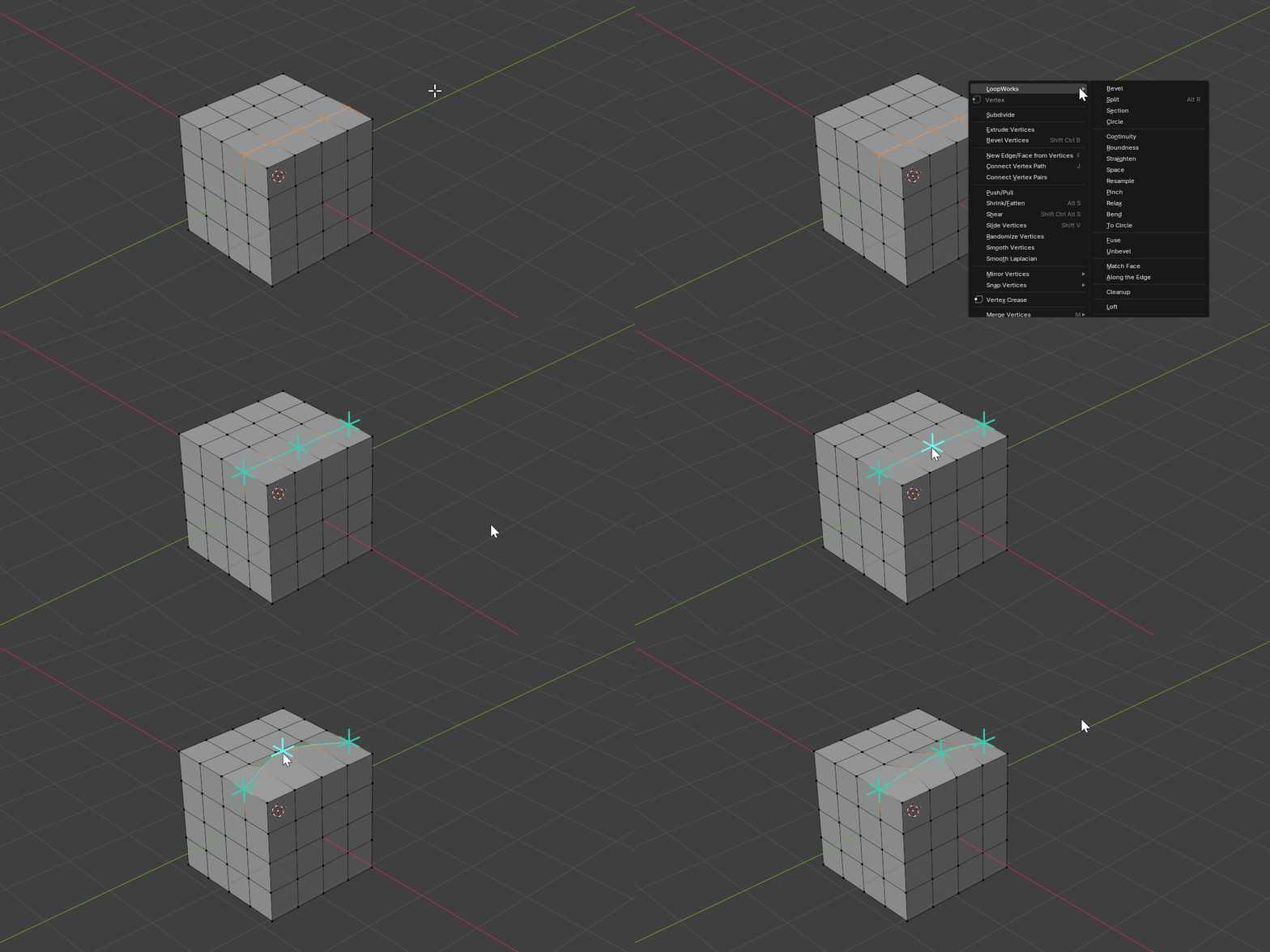
Bend is a modal tool. It fits a guide curve through each selected loop, drops a row of control points along it, and lets you reshape the geometry by grabbing and dragging those points directly in the viewport.
Hotkeys
| Key | Action |
|---|---|
Mouse Move | Hover / drag the nearest control point |
LMB | Grab the highlighted point / drop it |
RMB/ESC | Cancel the current drag, or cancel the operator |
Space/Enter | Confirm operation |
V | View-aligned motion (free) |
X / Y / Z | Constrain motion to an axis — press again to toggle Global/Local |
Shift+X/Y/Z | Constrain to the YZ / XZ / XY plane |
Scroll/+/- | Add or remove control points |
O | Toggle proportional editing |
Shift+O | Cycle proportional falloff |
Page Up/Page Down | Grow / shrink proportional radius |
+/- (proportional on) | Add or remove parallel rings |
B | Toggle pinned border points |
Ctrl+Z / Ctrl+Shift+Z | Undo / redo a control-point edit |
Properties
Points
- Description: Number of control points per loop
- Type: Integer
- Range: 3 to 24
- Default: 3
Axis
- Description: Constraint for control-point motion
- Type: Enum
- Options: VIEW / X / Y / Z / YZ / XZ / XY
- Default: VIEW
Space
- Description: Axis basis — Global (world) or Local (object)
- Type: Enum
- Options: GLOBAL / LOCAL
- Default: GLOBAL
Parallel Rings
- Description: Number of parallel-loop rings added on each side of the selected loops. Auto-added loops are dimmed and not grabbable, but still receive proportional spread.
- Type: Integer
- Range: 0 to 8
- Default: 0
Proportional Editing
- Description: Affect nearby control points (across selected loops) with falloff
- Type: Boolean
- Default: False
Proportional Size
- Description: Radius of proportional falloff in world units
- Type: Float
- Default: 1.0
Falloff
- Description: Shape of the proportional influence curve
- Type: Enum
- Options: Smooth / Sphere / Root / Inverse Square / Sharp / Linear / Constant / Random
- Default: Smooth
Pin Border Points
- Description: Keep open-loop endpoints fixed during proportional spread
- Type: Boolean
- Default: True
How It Works
- Each selected loop is sampled into a guide curve with evenly spaced control points
- Grabbing a point and dragging it reshapes the curve, and the loop vertices follow
- Axis keys constrain the drag to a line or plane;
Vreturns to free, view-aligned motion - With proportional editing on, neighbouring control points move together within the radius, weighted by the chosen falloff
- Parallel rings pull in adjacent loops so a bend can spread smoothly across a band of geometry