Fuse
Round selected chamfer cross-section edges into smooth, multi-segment bevels.
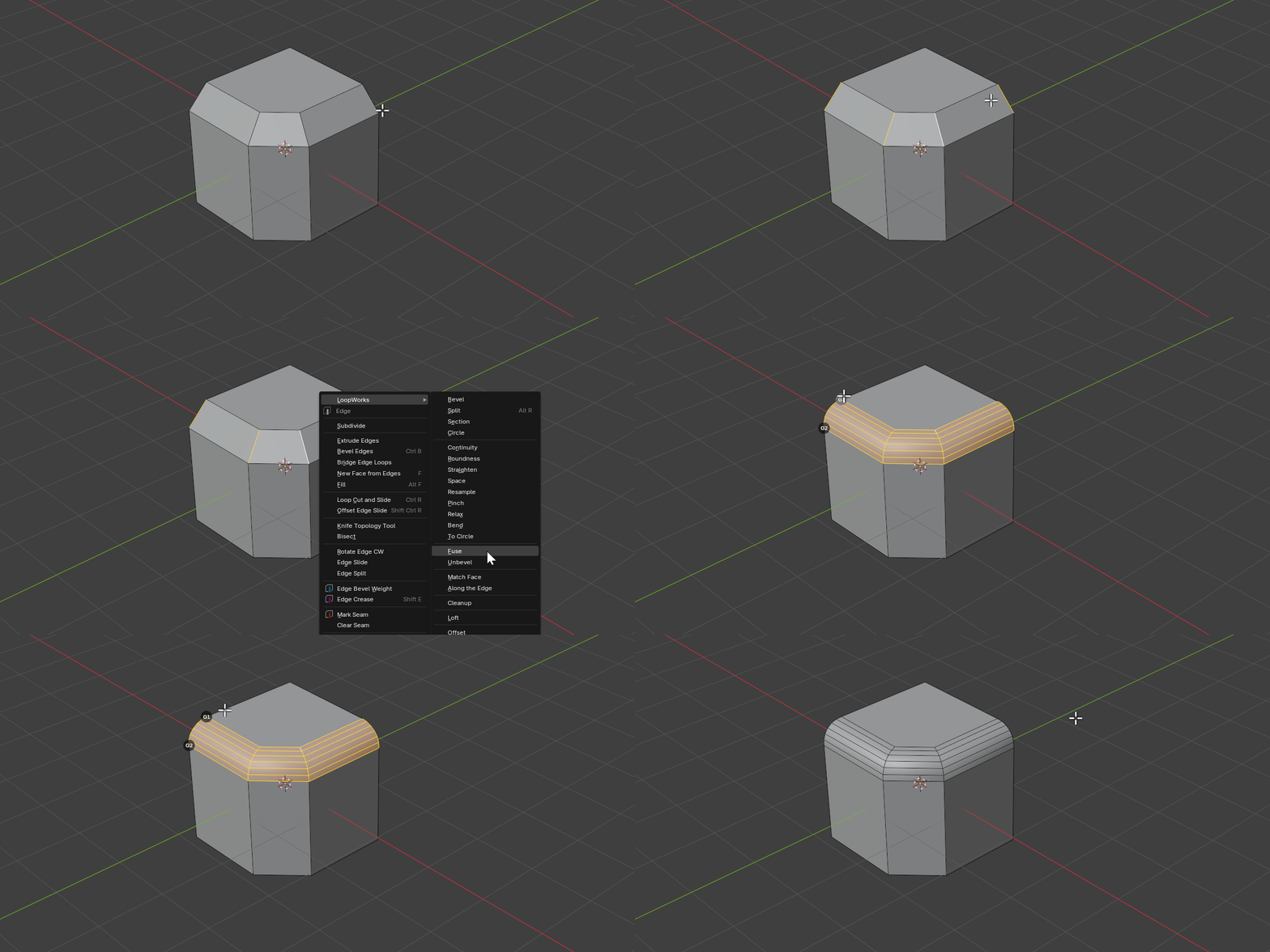
Select the edges that cross the chamfer (each pair sharing a quad) — the same edges that Unbevel’s Chamfer mode leaves selected — and Fuse rebuilds them into a rounded, CAD-continuous bevel.
Gizmo
After running Fuse, two G-continuity disks appear in the viewport at the two rail ends of the first cross-section. Click a disk to cycle its side through G0 → G1 → G2 → G3 and the bevel re-rounds instantly — no need to open the redo panel. The disk size and colors follow the LoopWorks gizmo theme in the add-on preferences.
Properties
Continuity A / Continuity B
- Description: Geometric continuity at the rail-1 (A) and rail-2 (B) side of every cross-section
- Type: Enum
- Options: G0 / G1 / G2 / G3
- Default: G2
Tension A / Tension B
- Description: Tension of the curve at the A / B side
- Type: Float
- Range: 0.0 to 5.0
- Default: 1.0
Segments
- Description: Number of segments across the rounded bevel
- Type: Integer
- Range: 2 to 64
- Default: 6
Smooth Shade
- Description: Apply smooth shading to the generated bevel faces
- Type: Boolean
- Default: True
How It Works
Fuse treats each selected cross-section as the profile of a bevel and replaces it with a smooth multi-segment curve:
- Detects the chamfer strips from the selected cross-section edges
- Builds a CAD-continuous curve per cross-section using the chosen continuity (G0–G3) and tension on each side
- Resamples the curve into the requested number of segments
- Rebuilds the geometry, optionally smooth-shaded
Fuse is the inverse companion to Unbevel → Chamfer: collapse a multi-segment bevel down to a single chamfer with Unbevel, then round it back up — at any segment count or continuity — with Fuse.